⚡ Don't Lock My PC
Keep your computer awake and unlocked while long-running AI agents do the work — then let it sleep normally when you're done.
“While AI agents are working, your system should never lock or sleep.”





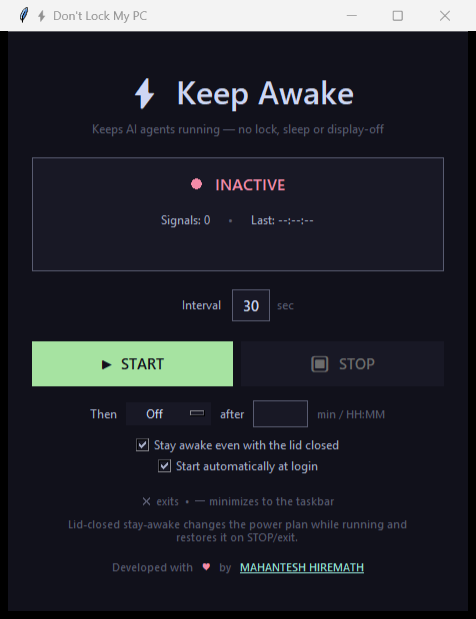
Why this exists
AI agents and automated workflows often run for minutes or hours. If you walk away, corporate or personal lock-and-sleep policies kick in — locking the screen, sleeping the machine, or turning off the display. That can pause the agent, drop an RDP session, or interrupt the task entirely.
Start Don't Lock My PC before a long run and it keeps everything awake until you click STOP — no registry hacks, no policy changes you can't undo.
🤖 Built for agent runs
Start it before a lengthy agent or automation task so the session never locks or sleeps mid-run.
🖥️ Cross-platform
One codebase, one identical UI on Windows and macOS, with OS-native mechanisms behind a small backend abstraction.
💤 Lid-close stay-awake
On Windows, optionally keep working with the laptop lid shut — your original power setting is restored on STOP.
⏻ Scheduled power action
Sleep, Hibernate, or Shut down after a timer — “keep my PC awake for the agent, then power it off when done.”
🫥 Zero footprint
An invisible F15 keypress and ±1px mouse nudges. No clicking, no typing, no interference with your work.
🚀 Start at login
Optional autostart via the Windows Run key or a macOS LaunchAgent, so it's
ready before your next run.
Quick start
- Download the archive for your OS from the buttons above or the latest release.
- Unzip it.
- Run
DontLockMyPC.exe(Windows) orDontLockMyPC.app(macOS).
Then press START, and the machine stays awake until you press STOP.
Full installation guide How it works
How it keeps you awake
| Platform | Prevent sleep / display off | Reset lock / inactivity timer |
|---|---|---|
| Windows | SetThreadExecutionState (ES_SYSTEM_REQUIRED | ES_DISPLAY_REQUIRED) |
SendInput mouse ±1px + invisible F15 keypress |
| macOS | built-in caffeinate -dimsu subprocess |
Quartz CGEvent mouse ±1px + invisible F15 keypress |
Why both mechanisms?
On Windows, SetThreadExecutionState prevents sleep but does not reset
the screen-lock timer — which is why the mouse + F15 nudge is also needed.
On macOS, caffeinate handles sleep while the Quartz events keep the
session active.
Developed with ❤️ by MAHANTESH HIREMATH